


Get your Shopify catalog ready for Black Friday. Book a demo before Nov 30 to unlock 20% off.
Book a demo
Menu
hero-header-logo
Built specifically for Shopify stores and ecommerce teams

Manage product images in Shopify without the Media Chaos

Organize, search, and update thousands of product images faster with a centralized media library built for Shopify teams.
Toriut helps ecommerce teams manage product images more efficiently by centralizing assets, automating bulk updates, and making product media easy to find
Problem

Problem

Managing product images in Shopify becomes chaotic as your catalog grows

As your product catalog grows, managing images inside Shopify becomes increasingly difficult. Teams often struggle with scattered assets, duplicates, and time-consuming manual updates.

Pain points:

  • Images scattered across Google Drive, Dropbox, and Shopify
  • Hard to find the right product image quickly
  • Duplicate or outdated product photos
  • Manual uploads and updates waste hours of work

Solution

Toriut organizes your Shopify product media

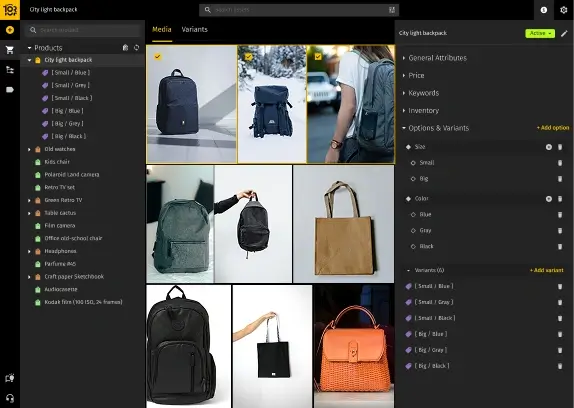
Toriut gives Shopify teams a centralized platform to manage, search, and update product images at scale.

Centralized media library

Centralized media library

Keep all product images organized in one place instead of scattered across folders and tools.

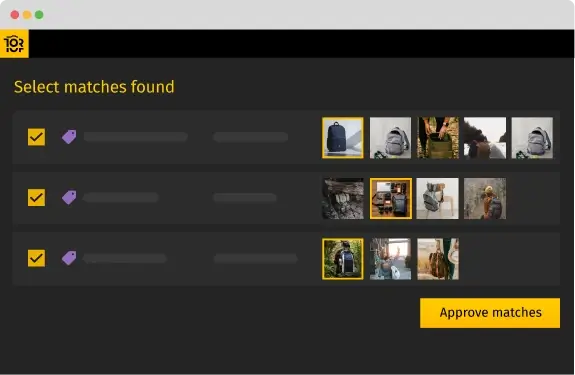
Bulk media matching

Bulk media matching

Automatically match images to Shopify products by SKU and update catalogs in minutes.

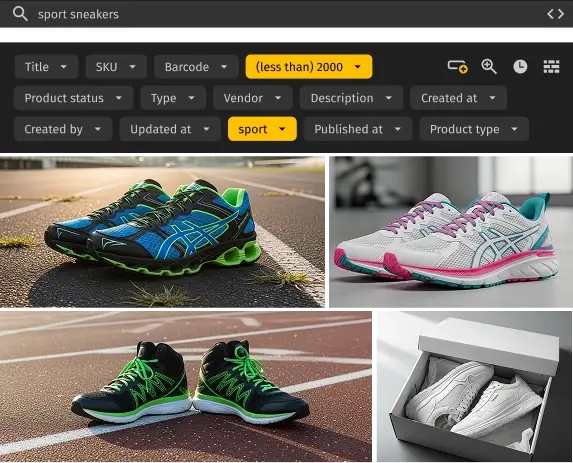
Visual search

Visual search

Find product images instantly using visual search instead of manually browsing folders.

Use Cases

When Shopify teams use Toriut common workflows Shopify teams solve with Toriut

  • Importing supplier product images
  • Quickly match hundreds of supplier images to products without manual work.
  • Updating seasonal collections
  • Managing large product catalogs
  • Replace or update product images across your catalog faster.
  • Keep thousands of product images organized and searchable.

Results from Shopify merchants

Andriana O.

CMO

5/5

"Automated our client catalog workflows and stopped spreadsheet hell"

What do you like best about Toriut PIM?

As an AI and digital automation agency (kodlo.ai), we build custom tech stacks and data pipelines for e-commerce clients. Handling product information across messy spreadsheets and disconnected folders was always a bottleneck until we integrated Toriut PIM. What stands out immediately is the clean master catalog architecture combined with the two-way Shopify sync. When our clients make minor adjustments directly in Shopify, Toriut captures those changes automatically without overwriting custom attributes...

Read More

Dmytro S.

Co-Founder

4.5/5

"Finally brought order to complex technical specs and compatibility tables on Shopify"

What do you like best about Toriut PIM?

Selling technical equipment and replacement parts means every single SKU has dozens of strict parameters – dimensions, voltage, model compatibility, and PDF installation guides. Trying to manage that directly inside the native Shopify admin alongside Notion docs and OneDrive folders was a recipe for costly customer returns.

Toriut gave us a structured environment where technical attributes are locked into clean templates. Our product specialists can bulk-update compatibility specs across hundreds of items at once, attach technical diagrams directly to the SKU in the built-in DAM, and push verified updates via the two-way Shopify sync. We also love how granular the user permissions are: external technical writers can enrich product descriptions and upload spec sheets without ever touching pricing or inventory SKU codes.

Read More

Verified User

Mid-Market

4.5/5

"Retail and wholesale catalogs that finally stay in step"

What do you like best about Toriut PIM?

We run 2 Shopify stores: retail + a separate wholesale store for cafés (with own trade prices, case quantities, and shorter range). In total that's about 3,700 SKUs incl. variants. We took some time figuring out if we need a PIM software at all given our scale, but Toriut's affordable pricing seemed to match what we needed without exceeding the budget. Now we have one master record per product, and the wholesale store is a channel layer on top, which is probably the best structure we could imagine for our case. Whenever we make any changes in the master (spec edits or photo swap), it reaches both stores, while trade price change reaches wholesale only. This is very convenient and has never let us down.

Read More

Stop managing product data in five places

Start your 14-day free trial — explore with sample data, import your catalog from CSV, or connect Shopify. Setup takes a few sessions to dial in, not weeks.

  • No store connection required to try
  • No credit card required