
Get a live demo this month → unlock 20% off. Offer ends Nov 30. Book a Demo
Book a demo
Menu

Product information. Less busywork.

PIM for
Small Business

When three people look after two thousand products, a simple price change can take the whole afternoon. Toriut is product information management for small business: your product data and images in one place, connected to your store. Updates can finally happen in one pass.

Book a demo

One shared record

What is PIM for a small business?

A PIM, or product information management system, is where your product data lives before it reaches the store: titles, descriptions, prices, variants, specs, and the images that belong to them.

PIM for a small ecommerce business serves a practical role. Every product has one record that everyone edits, every spec has a proper field, and changes reach your storefront without anyone retyping them.

A good PIM for small teams doesn't ask you to redesign how you work first. It takes the catalog you already have, fits the people who already run it, and keeps a simple product workflow: bring products in, fill in what's missing, publish.

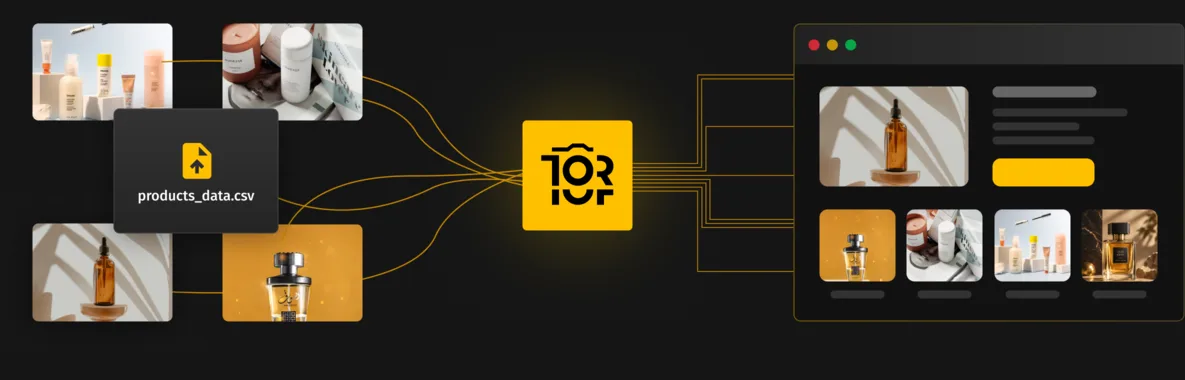
Product files and images flowing through Toriut into a storefront
  1. Product data + images

    Bring products in

  2. Toriut

    Fill in what’s missing

  3. Storefront

    Publish

When product information becomes hard
for a small team to manage

Most small teams don't start looking for a PIM until the same problems start turning up every week.
Four signs it's time to consider a PIM to make your life easier:

  1. 01

    Routine updates take whole afternoons.

    A new price or a seasonal tag means opening products one at a time, and it happens again next week.

  2. 02

    Several people edit the same fields.

    Someone fixes a description in the store’s admin, someone else re-imports last month's file, and eventually the fix disappears.

  3. 03

    Small errors start reaching customers.

    A wrong size chart, a photo on the wrong variant, a spec that doesn't match the box. Each one is minor until it turns into a return or a complaint.

  4. 04

    Your growing product catalog gets more complicated.

    More variants, more specs, a second store, suppliers sending files in their own formats. A process that worked at 300 products strains at 3,000.

See how Toriut works

The daily essentials

Essential PIM capabilities for a small business

PIM software for small business has to cover the daily basics well. These six are what a small team like yours uses most in Toriut.

Product structure

Attributes that match what you sell

Text, dropdown, number, measurement, date, checkbox and more. Map them to Shopify and use them as storefront filters, so shoppers can narrow down by size, material or fit. Every attribute also works as a search filter inside Toriut.
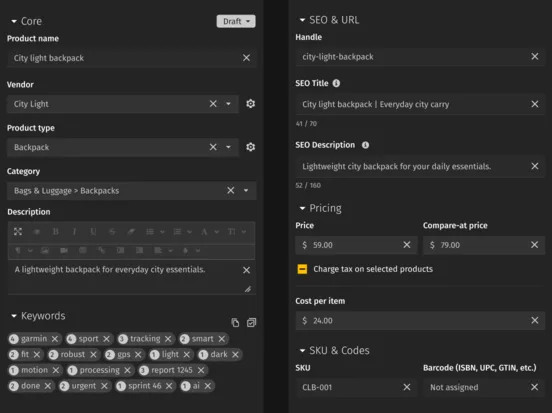
Product attribute fields in Toriut

Import from the files
you already have

Upload a CSV from your own export or a supplier. Toriut suggests the column mapping, lets you choose whether an import adds products, updates them, or both, and logs which rows were created or skipped.

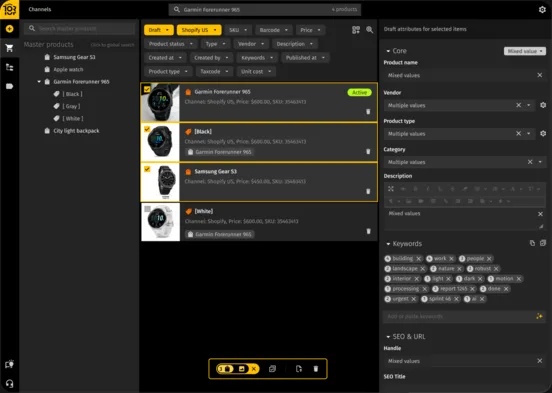
Bulk editing & Draft View

Bulk edits, prepared in advance

Change a price, description or attribute across a whole collection in one pass. For bigger changes, use Draft View: prepare them next to the live product, review them together, and set the date they go live.

Bulk editing and Draft View in Toriut

Built-in media

Images tied to the right products

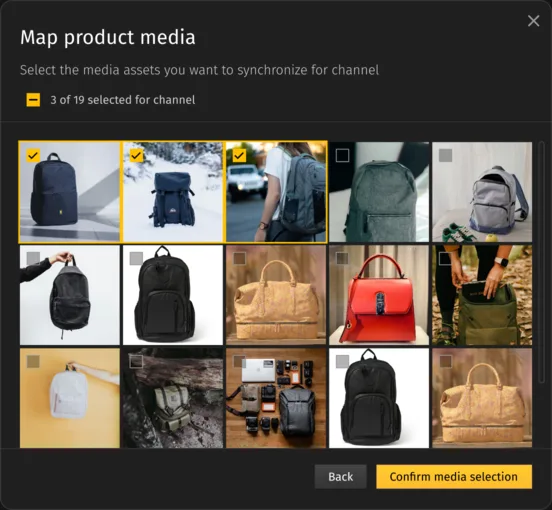
A built-in media library, running on the same engine as Pics.io, with versions, tags, folders and saved searches. Search works in both directions: every image of a product, or every product that uses an image.

Selecting product media to sync to a channel

Connected to Shopify

An actual two-way sync

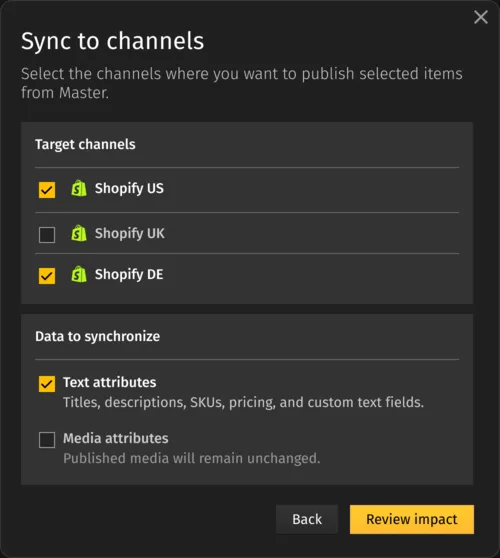
Toriut publishes your changes to Shopify and reads the store's live state back. If someone edits a product directly in the ecommerce platform’s admin, Toriut sees it instead of overwriting it.

Choosing Shopify channels and the data to synchronize

Access for the team,
links for everyone else

Give teammates the roles they need. Share collections with a photographer, agency or supplier through a Portal link that doesn't require a paid seat.

A practical checklist

What matters when choosing PIM for a small team

Before comparing any PIM solution for small business, check these five points. Each one decides whether a PIM saves you time or becomes one more subscription to worry about.

  1. Someone on your team can run it without IT.

    Ask who will set it up and who will maintain it. If the answer is "a consultant", keep looking. A PIM for lean teams should feel like editing products, not configuring software.

  2. It fits your products and needs.

    List the specs you actually sell by, such as sizes, materials, compatibility or care notes. Each one needs a proper field that can reach your store as a filter.

  3. It handles the files you already receive.

    Supplier spreadsheets will keep arriving in their own formats. You need column mapping, control over what an import may change, and a record of what happened.

  4. It respects edits made in your store.

    Small teams still fix things directly in the store’s admin panel. A tool that overwrites those fixes on the next sync creates work instead of removing it.

  5. The price stays manageable as you grow.

    Check what happens when you add a second store or start storing your images there. Those shouldn't arrive as new line items.

But what about spreadsheets?

If your team manages product information in spreadsheets, it can work for a while. Trouble starts when several people work from different copies, when supplier files need reshaping every week, or when nobody can say which version went live. At that point, keep the spreadsheet as an import source and let the PIM hold the record you publish from.

Spreadsheets

Toriut

Pricing

As a small business PIM, Toriut has one flat monthly plan, which is generally enough to cover what a small team needs.

What's included

How to start

  • Product records, custom attributes and variants
  • Bulk editing and Draft View
  • CSV import and export
  • Built-in media library
  • Portals for sharing with people outside your team
  • Publishing to your connected Shopify stores
  1. 1

    Look around with sample data. You don't need to connect a store first. 14-day free trial lets you get acquainted with the product before committing to it.

  2. 2

    Book a guided onboarding call. Our team walks you through setup and your first import on a live demo (it’s also free!)

  3. 3

    Connect your Shopify store and publish your first update. Sit back, relax, and watch the spreadsheet chaos disappear.

View pricing

Frequently asked questions

Why does a small business need a PIM?

Because even for small teams, when product data lives in spreadsheets, supplier files and the store at the same time, nobody’s sure which version is up-to-date. PIMs like Toriut gives each product one record to edit and check before it goes live, so a small team spends its time selling instead of finding the right files.

How much does PIM software cost for a small business?

Prices for PIM software for small businesses vary a lot between vendors. Toriut has one flat monthly plan with the media library and unlimited connected stores included.

Does a small business need both a PIM and a DAM?

Usually it needs the work of both, but not two separate tools to maintain. Product data and product images belong together, so Toriut keeps them in one place: the media library is included in the same plan, and every image stays linked to the products that use it.

Can we keep using our spreadsheets when we move to a PIM?

Yes. Upload a CSV from your own export or a supplier, and Toriut suggests the column mapping, lets you choose whether to add, update products, or both, and logs which rows were created or skipped.

How do I choose a PIM for a small business?

Look for one your team can run without IT, with the essentials included. Toriut covers product data, bulk editing, supplier imports and a built-in media library in one flat plan, and you can try it with sample data first.

See if Toriut fits your team

Book a demo to see how it handles product data, supplier files and publishing to your storefront. Ask any questions, get answers, and make an informed decision.