

Cases
supplier-range.csv
Your supplier sends a file with new products.
Results
Bring them into Toriut, check their details and variants, and send the prepared range to your selected connected stores.
Toriut isn't available on mobile yet
To use Toriut, open it in a desktop browser. Mobile support is coming later.
Add new products and roll out updates across your stores. Need to launch a supplier’s new range or update hundreds of products in several stores? Import your CSV into Toriut, review the products together, then send them to the connected stores you choose.
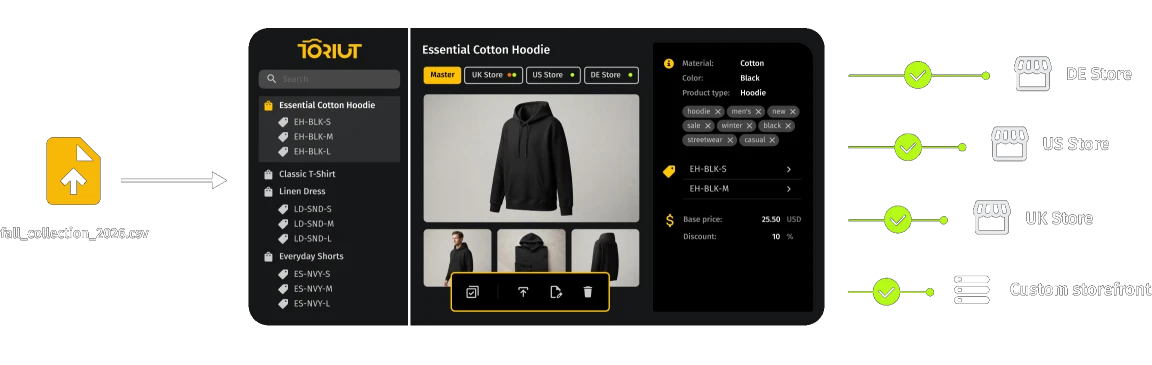
Toriut keeps a shared product catalog for your stores. Bring in new products or changes from a file, prepare the information once, and reuse it wherever those products are sold, instead of repeating the same edits in every store. It is CSV product import software for teams that get supplier files, move a catalog from another system or update products in bulk.
CSV and XLSX files. No Shopify connection needed to try it.
One workflow, three everyday jobs
Three jobs cover most files, and one import handles all of them. A supplier file, a catalog move or a bulk product import that changes prices follows the same path: import, prepare, send to the stores you choose.
Cases
supplier-range.csv
Your supplier sends a file with new products.
Results
Bring them into Toriut, check their details and variants, and send the prepared range to your selected connected stores.
Cases
previous-catalog.csv
You have a product export from your previous system and a new store to fill.
Results
Build your catalog in Toriut from the export, including product images from links in your file. Review the products, complete any missing content, and send them to your new connected store.
Cases
product-updates.xlsx
New descriptions, revised prices or corrected specifications can affect hundreds of products.
Results
Import the changes into your shared catalog, then send the updated products to the connected stores that need them.
From spreadsheet to structured products
PIM CSV import in Toriut turns a spreadsheet into products you can review before they reach any store. Match your file’s columns to product details such as names, prices, materials and image links.
| A | B | C | D | E | F |
|---|---|---|---|---|---|
| Parent SKU | SKU | Title | Price | Color | Size |
| DEMO-RLS-BASE | Relaxed Linen Shirt | 46.00 | |||
| DEMO-RLS-BASE | DEMO-RLS-NVY-S | Navy / S | 46.00 | Navy | S |
| DEMO-RLS-BASE | DEMO-RLS-SGE-S | Sage / S | 48.00 | Sage | S |
DEMO-RLS-BASE
→ Navy / S · 46.00 → Sage / S · 48.00
One parent product. Two variants, each with its own SKU and price.
Preview your file to check that names, prices and other values appear correctly before continuing,
and adjust the settings if something looks off.
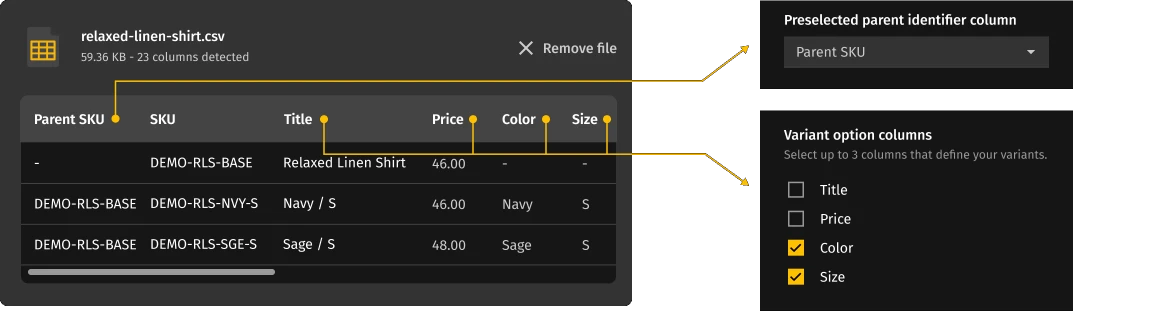
For products with variants, choose the fields that identify which variants belong to the same product, then specify the options that distinguish them, such as size or color. Each variant keeps its own details, including its SKU and price.
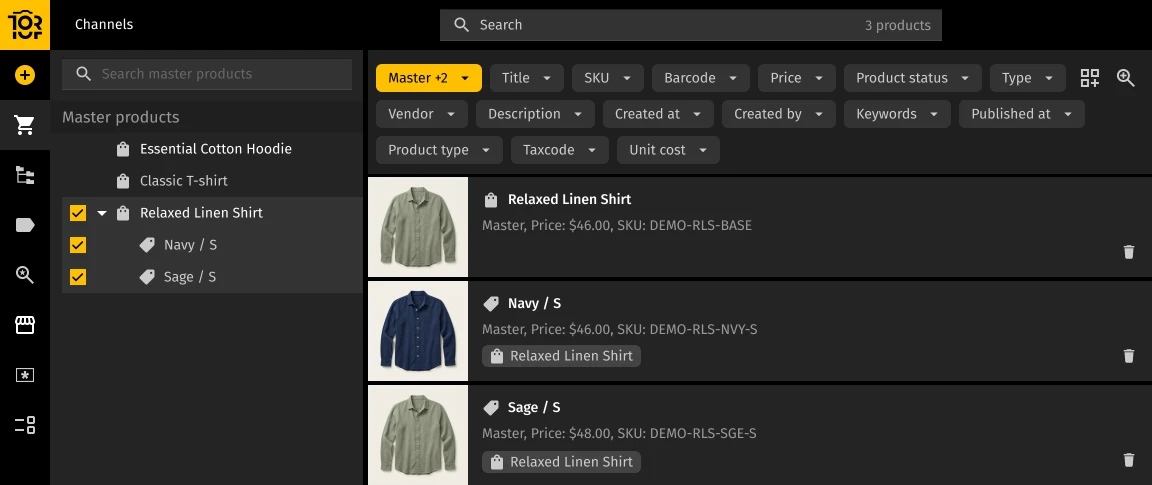
Result:
One Relaxed Linen Shirt with two variants, Navy / S and Sage / S, each with its own SKU and price. Review the resulting products and variants before sending them to your connected stores.
The full column reference and step-by-step instructions are in the Help Center: Importing products via CSV in Toriut.
Check before you import
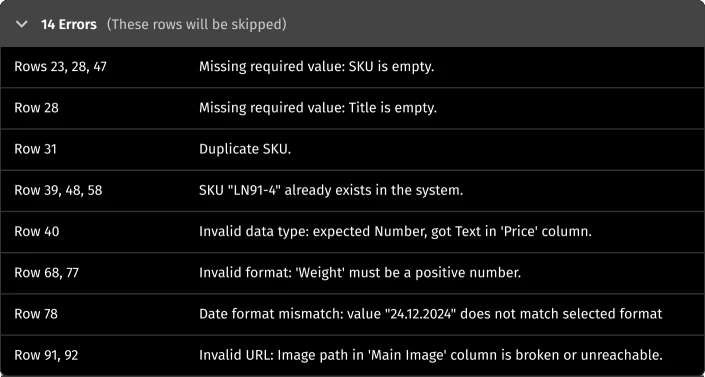
Before you start the import, Toriut checks for issues such as duplicate SKUs, missing required values and incorrect data formats. See which rows need attention and what needs fixing, so you can correct the file before applying changes.
You control what changes
The import mode you pick decides what happens to every row in the file.


Use Add & Update (the default) to add new products and update existing ones in the same import.

Use Add only to create new products while leaving matched existing products untouched.

Use Update only to change existing products without creating new ones from unmatched rows.
Your file may contain only part of the information already in your catalog.By default, Toriut skips empty cells and keeps the existing values.If you intend to clear a field, you can explicitly choose that behavior for the column.
Empty cell in your file
Existing value stays in the catalog

Andriana O.
CMO
What do you like best about Toriut PIM?
As an AI and digital automation agency (kodlo.ai), we build custom tech stacks and data pipelines for e-commerce clients. Handling product information across messy spreadsheets and disconnected folders was always a bottleneck until we integrated Toriut PIM. What stands out immediately is the clean master catalog architecture combined with the two-way Shopify sync. When our clients make minor adjustments directly in Shopify, Toriut captures those changes automatically without overwriting custom attributes...

Dmytro S.
Co-Founder
What do you like best about Toriut PIM?
Selling technical equipment and replacement parts means every single SKU has dozens of strict parameters – dimensions, voltage, model compatibility, and PDF installation guides. Trying to manage that directly inside the native Shopify admin alongside Notion docs and OneDrive folders was a recipe for costly customer returns.
Toriut gave us a structured environment where technical attributes are locked into clean templates. Our product specialists can bulk-update compatibility specs across hundreds of items at once, attach technical diagrams directly to the SKU in the built-in DAM, and push verified updates via the two-way Shopify sync. We also love how granular the user permissions are: external technical writers can enrich product descriptions and upload spec sheets without ever touching pricing or inventory SKU codes.
Verified User
Mid-Market
What do you like best about Toriut PIM?
We run 2 Shopify stores: retail + a separate wholesale store for cafés (with own trade prices, case quantities, and shorter range). In total that's about 3,700 SKUs incl. variants. We took some time figuring out if we need a PIM software at all given our scale, but Toriut's affordable pricing seemed to match what we needed without exceeding the budget. Now we have one master record per product, and the wholesale store is a channel layer on top, which is probably the best structure we could imagine for our case. Whenever we make any changes in the master (spec edits or photo swap), it reaches both stores, while trade price change reaches wholesale only. This is very convenient and has never let us down.
On the upload step of the import wizard, click Download sample file. It is a ready-made catalog with parents, variants and several attribute types, so you can watch a product CSV import work before you prepare your own file. You do not need a connected store.
Not by default. Skip empty cells leaves the current value untouched. To clear a field with blanks, switch that column to Erase existing.
Toriut scans the file before it writes anything. Rows with errors are skipped, rows with warnings still import with adjustments (an image link that times out, for example), and Import valid rows runs only the clean ones. Download the error report, fix the flagged rows and upload the corrected file. In Add & Update or Update only mode, matching SKUs update the products already imported.
Workspace admins can always import. Other roles need the Can import products via CSV permission, which an admin grants on purpose because a bad import can change the whole catalog. Without it, the import wizard is not shown.
Yes. Master only is the default import target, so products are created in Toriut and nothing is sent to any store. Connect Shopify when you are ready to send products to your stores.
Full walkthroughs: Importing products via CSV in Toriut and How to bulk edit Products and Variants in Toriut.
Bring a supplier file or a product export to a demo. We’ll walk through adding or updating the products in Toriut, sending them to your selected connected stores and checking the results. Or start a 14-day free trial and explore the workflow with our sample catalog.