
Essayer gratuitement
Menu

PIM multi-boutiques · DAM intégré

Gérez plusieurs boutiques Shopify depuis un catalogue maître

Vous gérez plusieurs boutiques Shopify par région, marque ou canal ? Toriut conserve un catalogue maître et envoie chaque produit, prix et image à chaque boutique — vous créez une fois et publiez partout, au lieu de copier les données entre admins.

  • Connecter n'importe quelle boutique Shopify
  • Aucune boutique requise pour essayer
  • DAM intégré
Vous pouvez avoir autant de boutiques Shopify
que vous voulez.
Shopify permet d'ouvrir une boutique séparée pour chaque région, marque ou canal. Ce qu'il ne fournit pas, c'est un endroit unique pour gérer les mêmes produits sur toutes — chaque boutique devient son propre catalogue et ils divergent.
Les garder synchronisées est la partie difficile.
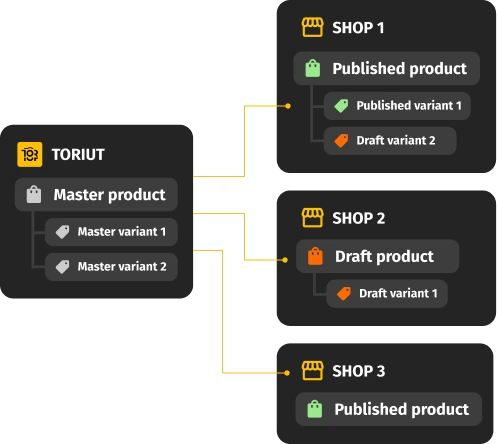
Toriut se place au-dessus de vos boutiques. Un catalogue maître contient chaque produit, chaque boutique est une couche par-dessus. Vous créez un produit une fois, choisissez les boutiques concernées et publiez — sans le reconstruire dans chaque admin.

De boutiques dispersées à un catalogue maîtrisé

One master catalog

A single source of truth above all your stores

  • Every product is one master record with all its attributes, variants, and media
  • Your stores stop being independent catalogs that drift apart
  • Start by connecting a store, importing a CSV, or exploring on sample data

Toriut master catalog above multiple Shopify stores

Per-store channel layers

Edit once, push to every store — override where a store needs it

  • Each store is a layer on top of the master record
  • Edit the master and every connected store updates
  • Override price, copy, media, visibility, or variants for a single store
Edit once and push product updates to every Shopify store

One-click distribution

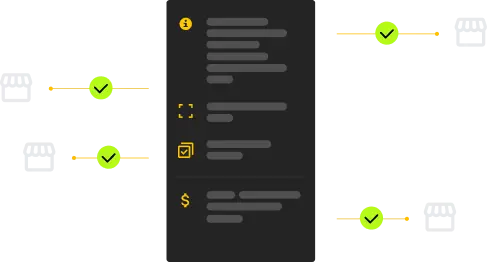
Publish a product to one store or to all of them at once

  • Pick the stores, hit publish — Toriut pushes the product to each of them
  • Change a product's status once and it applies across every store you selected
  • No more "switched it off in one store, forgot another"
Publish a product to one Shopify store or all connected stores

Staged publishing

Prepare changes as drafts, publish when you're ready

  • Prepare each store's changes as a draft inside Toriut
  • Review internally before anything reaches a live storefront
  • Publish to one store or several in a single click when it's time
Prepare Shopify store changes as drafts before publishing

Tout ce qu'il faut pour gérer plusieurs boutiques Shopify

Des fonctionnalités adaptées aux opérateurs multi-boutiques — un catalogue, plusieurs vitrines.

Master Catalog

One canonical record per product — attributes, variants, media — that every connected store pulls from.

Multi-store Channel Layers

Run multiple Shopify stores from one master. Override price, copy, media, and variants per store — without duplicating products.

One-Click Publishing

Send one product to two, ten, or every connected store at once. Toriut publishes to each store for you.

Variant Manager

Keep the full variant structure in the master and publish only the subset each store needs, so a store never carries the whole option matrix.

Built-in DAM + Renditions

Product media lives next to products: versions, tags, bulk image matching, and renditions that resize, crop, and convert per store.

Roles & Permissions

One workspace for the whole team. One team runs Store A, another Store B — each sees only their part, instead of a shared login.

Intégrez les fournisseurs et mettez à jour les boutiques en masse

CSV import wizard

Bring a supplier file in, distribute it to your stores

  • Preview the columns and rows from your file before importing
  • Choose add-only, update-only, or add + update
  • Variants are detected and grouped under the right product
  • A sample CSV lets you try the flow without your real data

Attribute mapping

Less setup friction when you import

  • Auto-suggest matches your column names to Toriut fields
  • An "Add missing fields" button creates the fields you don't have yet
  • On a trial, mapping is optional — you can skip it and still see results

Conçu pour les marques gérant plusieurs boutiques Shopify

Quelle que soit la croissance de vos boutiques — régions, marques ou canaux — le workflow reste le même : un catalogue, plusieurs vitrines.

Toriut dashboard for brands running multiple Shopify stores
Multi-store product workflow in Toriut

One catalog across every country store

Sell the same assortment through a separate store per market. Shared data stays in the master; each store's layer controls the price, currency, and media that market needs.

Several storefronts without several catalogs

Different local brands, mostly shared products. Manage them all from one master catalog instead of maintaining a separate catalog inside every store admin.

Scale stores without scaling manual work

When your advertising scales faster than your operations, every new store adds manual load. A new product reaches all your stores in one click — so headcount doesn't grow one-for-one with store count.

Manage client stores from one dashboard

Running multiple Shopify stores for clients? Keep every catalog in one workspace with roles and permissions, instead of logging into a different admin for each account.

Comment Toriut connecte vos boutiques Shopify

1

Connect your stores

Connect each Shopify store, or start on sample data if you're not ready to connect a live store yet.

2

Build the master catalog

Products, variants, and media come into Toriut as one master record per item.

3

Set per-store layers

Add a channel layer per store and override only the fields that differ by market.

4

Publish everywhere

Push changes to one store or every store in a click. Update the master, every store updates.

  • Capterra badge
  • Software Advice badge
  • GetApp badge
  • Crozdesk Happiest Users badge
  • Crozdesk Trusted Vendor badge
  • Crozdesk Quality Choice badge

Questions fréquentes

Can you have multiple stores on Shopify?

Yes. Shopify lets you create as many separate stores as you need — each is its own account with its own admin. What Shopify doesn't provide is a single place to manage the same products across all of them. Toriut adds that layer: one master catalog that publishes to every connected store.

Can you manage multiple Shopify stores from one account?

Not from inside Shopify itself — each store has its own admin. With Toriut you connect all your Shopify stores to one Toriut account and manage their products, variants, media, and status from a single workspace, with roles and permissions for your team.

How does Toriut keep multiple Shopify stores in sync?

Every product is a master record in Toriut, and each store is a channel layer on top of it. Edit the master and every store updates; override a field when one store needs something different. You publish to one store or all of them in a single click — no editing each admin by hand.

Can each store have different prices, copy, or media?

Yes. Channel layers let each store carry its own price, description, media, visibility, and variant selection, while shared data stays in the master. That's what makes running region- or brand-specific stores from one catalog possible.

Do I need Shopify Plus to run multiple stores?

No. Toriut works with standard Shopify stores as well as Shopify Plus. You connect each store as a channel regardless of plan — the multi-store workflow is the same either way.

Can I try it without connecting a live store?

Yes. Start with sample data or import a CSV — no store connection required. Connect your real Shopify stores whenever you're ready, so you never risk touching a production store before you trust the platform.

Arrêtez de gérer les mêmes produits dans chaque admin Shopify

Rassemblez toutes vos boutiques Shopify dans un catalogue maître. Créez une fois, localisez par boutique, publiez partout. Commencez avec des données d'exemple — aucune boutique requise.